


Benefit 1. Capacity Planning with Cora’s Strategic Portfolio Management (SPM)
Pretty much the first thing any of our clients in the financial services sector want to talk to us about is capacity planning. They need their senior executives to be able to have immediate visibility into how their resources are allocated, and what their capacity looks like over various different timeframes.
It’s all very well seeing a project and a list of numbers and skill sets next to it. What you really need is to be able to put all of that in context, and to see how those numbers and that information relate to and affect the rest of your portfolio. And what effect changing any of those milestones and numbers might have.
Scenario planning and what-if scenarios
This is what Cora’s Strategic Portfolio Management (SPM) functionality has been built to address. It’s gives you that 30,000 foot, bird’s-eye view of exactly where everything is now. And, crucially, it provides you with the tools to explore how re-allocating resources across your portfolio could improve the value it delivers to your organization.
Using the Scenario Planning tools, you can explore any number of what-if scenarios in a visualized way, using easy to read charts and graphs. Everything’s dynamic and responsive, so any changes that you make are automatically factored in to everything else. So you can then adjust any of the variables to see what effect that would have.
Watch this video on Cora’s SPM.
If, for example, you were to delay the timeline on projects X and Y by moving their start dates from the second to the third quarter, how would that effect the number of, say, project managers and senior IT execs that you’d then have available to use in that second quarter? Or in the third?
And you can configure what you view on your dashboard according to your role, the kinds of projects you oversee and what your priorities are, which you can weight using the prioritization matrix.
So you can easily and instantly see how each of your individual elements fit in to the rest of your overall picture, and can demonstrate to others what all that info has to tell you.
All of which will give you invaluable insights about how to allocate your resources more effectively, to ensure you’re generating the greatest possible value from your portfolio.
Benefit 2. Configured for Capitalized Labor
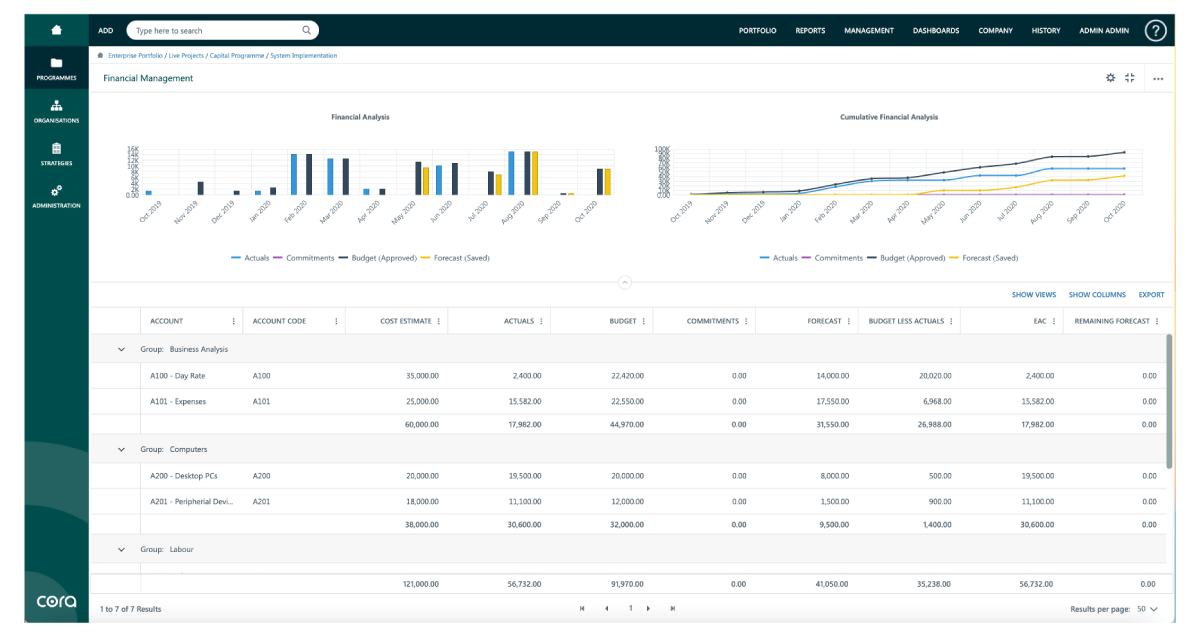
Whenever you deliver financial products to the market around, say, debit or credit cards, or kiosks at retail outlets and the services they need, some elements of that process need to be capable of being capitalized, so you can defer the cost of that labor.

So if, say, your labor costs on a project are going to be $1,000,000, if those costs can be capitalised, finance can divide those costs over 5 years. So instead of having to account for that $1 million now, it can be spread over 5 years and be accounted for in tranches of $200,000 a year. Which will make you considerably more profitable for this current year.
And as many senior execs are encouraged, and often required to deliver a quota of capitalizable labor costs to their CFO every quarter, this is something that’s obviously of critical importance to anyone working in the financial services sector.
Configured for you by Cora
When you decide to go with Cora, there are effectively two stages of configuration we walk you through. First, before you ‘go live’ we sit down with you to configure the out-of-the-box Cora to make sure that it does exactly what you need it to – we discuss the second stage below.
So we can configure it with the attribute, is this project capitalizable. Then, at the task level, are these capitalizable tasks, and so on. All of which can be set up so that everything has to be done within a specific timeframe. You can then set it up so that a report is then sent over to finance so that all those costs can duly be capitalized.
We’ll then work together with you on the implementation process to make sure that everything around that works exactly as you need it to.
Benefit 3. Document Workflow and Audit Trails
Being able to refer back to a reliable audit trail is important for all businesses, but in the financial services sector it’s absolutely vital. Cora’s Document Workflow for a project is structured around a ring-fenced sign off process that gives you a cast-iron audit trail.

And because everything is time and user stamped, you can immediately see (and produce evidence for) who was sent which email, whether that mail was opened and read, by whom, and what was done subsequently. Which gives you immediate visibility and provides you with effortless control over all governance issues.
Archiving documents
Any document, in whatever format, that gets fed into the Document Management system can then be archived if needs be, which process can be configured in whatever way makes the most sense for your particular organization. You just drag and drop whatever you need into pre-existing templates. And if you need files and or documents to be deleted after a certain time period, simply tick the appropriate boxes, depending on the attributes you need.
Watch this video on Cora’s Document Management tools.
And should a 3rd party drag you into a dispute so that you then need to retrieve specific information, it’s incredibly easy to use the search (and tag) functionality to narrow down and find whatever it is you want. Nothing is ever lost and it all gets archived in exactly the way you need it to be.
It’s all incredibly intuitive and effortlessly easy to use.
Benefit 4. Cora Portals and Stakeholder Management
Stakeholder management is important for anyone working in a senior or managerial position in a large organization, but when that organization is in the financial services sector it’s absolutely fundamental. Because, almost by definition, pretty much everything you do involves the exchange and moving around of sensitive information.
On the one hand, internally you’re going to be sending different kinds of data sets to, say, accounts, finance and your CFO, who will each have different areas and elements that they need prioritized.
And on the other, you have to engage with any number of different external third parties whose expertise you’ll need for capital projects, IT infrastructure and security issues, both cyber and physical. So you need complete control over your governance around all security and confidentiality matters.
Cora Portals
This is what Cora Portals have been designed to address. You get to configure the portal so that the party you’re designing it for only sees exactly what you want and need them to be able to see there. You simply select from one of the pre-existing templates, and drag and drop whatever elements you want to have included there.

And because the portal sits within the overall system, there’s no annoying admin around permissions or access. It’s literally just a box-ticking exercise. All you have to decide is, what data do you want them to have access to, and who do you want to grant that access to.
You don’t even have to worry about them seeing the fields that they don’t’ have access to in grey. You can similarly select which fields they get to see, so they won’t even be aware of the elements that they don’t have access to.
And, as with everything else, it’s all intuitive, dynamic and incredibly easy to use.
Benefit 5. Employee Buy-in and Ease of Use
We’ve been working with organizations for more than 20 years helping them to successfully implement their digital transformation programmes. And one of the most common complaints we hear is around employee buy-in.
Nobody questions the importance of going fully digital. We’ve all had experience of not being able to find out exactly where a project is because everyone’s using different systems or software, or, worse, not using any software at all. Or of finding out that the figures you’ve been working from are out of date, inaccurate, inconsistent or just generally unreliable.